
What a Temporary Email Can and Cannot Hide
By CatchTempMail · Published August 2, 2026
A temporary email address can help you register for a website, receive a verification message, or download content without giving the website your permanent email address.
That is a useful privacy benefit, but it does not make you anonymous.
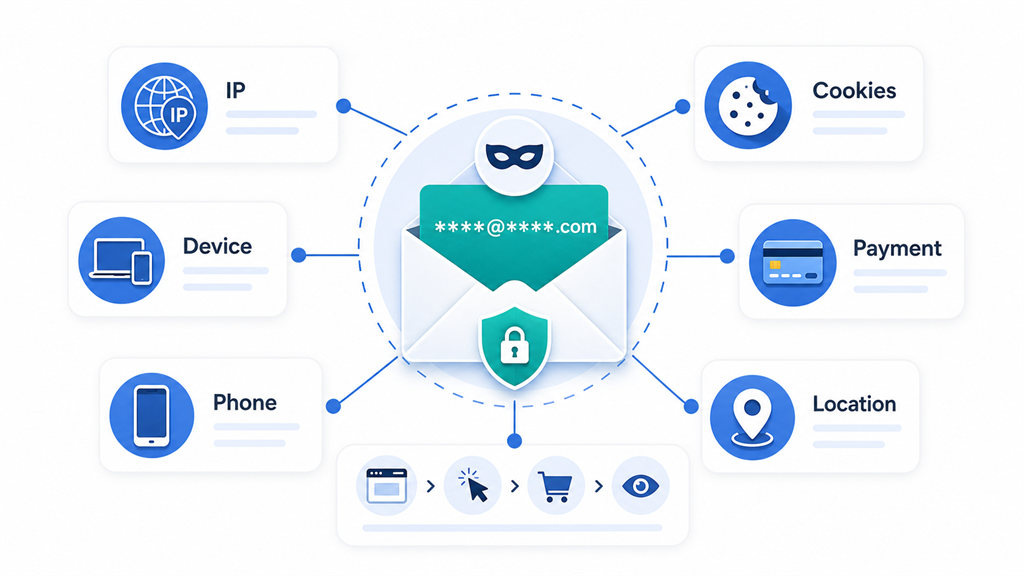
Websites can collect information from many sources besides an email address. Your IP address, browser, device, cookies, payment details, phone number, username, and activity can all provide additional ways to recognize or identify you.
Understanding this distinction helps you use temporary email effectively without expecting it to provide protections it was never designed to offer.
This guide explains what a temporary email can hide, what it cannot hide, and when you should use a temporary inbox instead of a permanent address.
What is a temporary email address?
A temporary email address is an address created for short-term use.
It usually gives you access to an inbox where you can receive messages without registering for a traditional email account. Depending on the provider, the address and its messages may expire automatically after a limited period.
Temporary email is commonly used to:
- Receive a one-time verification code
- Test an application or signup process
- Access a free download
- Try a service before committing to it
- Avoid promotional messages
- Separate low-priority registrations from important email
- Reduce exposure of a permanent address
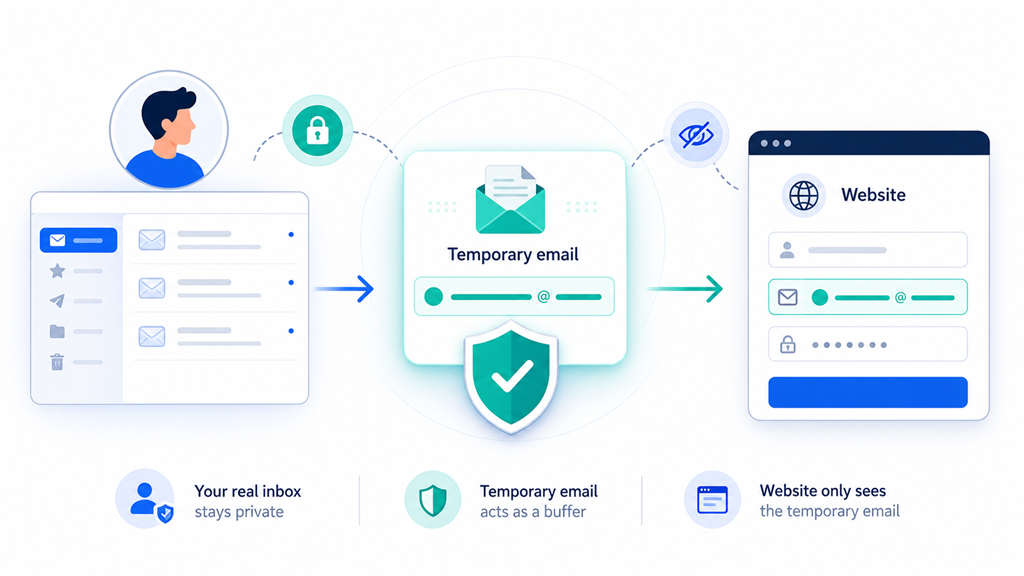
Its main privacy function is straightforward: the website receives the temporary address instead of your regular email address.
What does a temporary email hide?
A temporary address can hide certain information from the website or sender receiving it. The amount of protection depends on how you use the address and what other information you provide.
Your permanent email address
This is the primary benefit.
When you enter a temporary address into a form, the website does not automatically receive your personal, work, or long-term email address.
For example, instead of sharing:
firstname.lastname@example.comyou might use an unrelated temporary address:
random-address@example.netThe second address does not immediately reveal your name, employer, school, or usual email provider.
Services such as Apple's Hide My Email use a related principle by generating unique random addresses that keep a personal address private while forwarding messages to the user. A disposable inbox differs because it normally receives messages directly and is intended for short-term use rather than permanent forwarding.
Some direct connections to your identity
A permanent email address is often reused across many websites. That makes it a useful identifier for connecting activity across services.
Suppose you use the same personal address for:
- Shopping
- Newsletters
- Social media
- Online communities
- Contests
- Free downloads
- Mobile applications
Each organization has the same stable identifier. Data collected from different sources may potentially be connected to that address.
Using a separate temporary address for a low-risk registration removes that shared email identifier from the transaction.
This does not prevent every form of tracking, but it can make simple email-based correlation more difficult.
Your normal inbox from future marketing messages
A temporary email can keep newsletters, promotional campaigns, reminders, and follow-up messages away from your permanent inbox.
Once the temporary inbox expires, later messages sent to that address may no longer reach you.
This can be useful when a website requires an email address before showing content, but you do not want an ongoing relationship with the sender.
The FTC recommends being selective about where you share an email address and using spam controls to reduce unwanted messages. Temporary addresses provide another way to separate low-value registrations from a primary inbox.
Your permanent address during a data breach
If a website stores only your temporary address, a later breach of that website should not directly expose the permanent address you did not provide.
The breached information may still include other data, such as:
- A username
- An IP address
- A password hash
- A phone number
- A shipping address
- Purchase history
- Device or session information
Temporary email reduces exposure of one data point. It does not protect information you separately submit to the website.
Your identity from casual inspection
A temporary address is usually less revealing than an address containing your real name, birth year, employer, or organization.
For example:
janesmith1988@example.commay disclose more than:
x7k29@example.netAn unrelated address can prevent a merchant, forum user, or newsletter operator from learning personal details simply by reading the address.
This protection is limited if you use your real name elsewhere in the same registration.
What can a temporary email not hide?
A temporary email changes the address you provide. It does not automatically change the rest of your internet connection or browser environment.
Your IP address
When you visit a website, your device or network normally connects to the website's server. The server can generally receive the public IP address used for that connection.
A temporary email address does not replace or mask that IP address.
An IP address may help estimate:
- Your country
- Your region or city
- Your internet provider
- Whether you are using a residential, mobile, corporate, hosting, proxy, or VPN network
Location estimates based on IP addresses are not always accurate, but the address can still be useful for security, fraud prevention, analytics, and tracking.
A VPN or privacy relay may change the IP address visible to a website. A temporary email does not perform that function.
Your browser and device information
Websites may receive technical information about the browser and device used to access them.
Depending on the website and browser permissions, this may include:
- Browser type and version
- Operating system
- Screen dimensions
- Language
- Time zone
- Device category
- Graphics capabilities
- Supported features
- Installed or available fonts
- Certain hardware characteristics
Some trackers combine multiple characteristics into a browser fingerprint. Mozilla describes fingerprinting as a tracking method that attempts to identify users through a combination of device and browser characteristics, which is why Firefox includes protections against known fingerprinting techniques.
Using a temporary email does not alter your browser fingerprint.
Cookies and local storage
Websites commonly place identifiers in cookies or other forms of browser storage.
A temporary address does not delete those identifiers.
If you previously visited a website using your normal email address and later return with a temporary address in the same browser, the website may still recognize the browser through an existing cookie.
Private or incognito browsing can create a more isolated browser session, but it does not automatically hide your IP address, prevent all fingerprinting, or make you anonymous to websites.
Information you enter into the website
Temporary email cannot hide information you voluntarily provide elsewhere in a form.
That may include:
- Your real name
- Home address
- Phone number
- Date of birth
- Employer
- School
- Profile photograph
- Government identification
- Payment information
- Social media username
Providing a random email address offers little anonymity if the same account contains your full name, phone number, and credit card.
Your payment identity
When you make a purchase, the merchant or payment processor may receive billing-related information.
Depending on the transaction, that may include:
- Cardholder name
- Billing address
- Payment token
- Card type
- Transaction identifiers
- Fraud-prevention signals
Using a temporary email does not anonymize a credit card, bank account, PayPal account, Apple Pay transaction, or other payment method.
It may keep the receipt away from your permanent inbox, but the payment can still be connected to you through other information.
Your phone number
Many services request phone verification in addition to email verification.
A temporary email does not hide a phone number that you provide. Phone numbers are relatively stable identifiers and are often connected to accounts across multiple services.
If a site requires both an email address and a personal mobile number, using temporary email protects only the email-address portion of the registration.
Your activity after registration
A temporary address does not prevent a website from recording what you do while using the service.
The website may still record:
- Pages viewed
- Searches performed
- Buttons clicked
- Files downloaded
- Products purchased
- Messages posted
- Login times
- Session duration
- Referral source
- Advertising interactions
The site may associate that activity with the temporary address, an account ID, a cookie, an IP address, or another identifier.
Your identity from writing and behavior
Even without a personal email address, your behavior may reveal who you are.
Examples include:
- Reusing the same username
- Uploading the same profile picture
- Writing about personal details
- Linking to another social account
- Using a distinctive writing style
- Posting at predictable times
- Reusing the same password
- Mentioning your location or workplace
Temporary email protects the address field. It cannot prevent users from identifying themselves indirectly.
Your information from the temporary-email provider
A temporary email service must process enough information to provide its service.
Depending on its design and policies, a provider may process technical data such as requests, abuse-prevention signals, message-routing information, or server logs.
Using temporary email therefore does not mean that no service involved can observe anything about the session.
Before using any privacy-related service, review its privacy policy, retention practices, security model, and inbox-access design.
Tracking inside received emails
A message delivered to a temporary inbox may contain:
- Tracking pixels
- Tracked links
- Unique recipient identifiers
- Redirect links
- Marketing parameters
If remote content is loaded, the sender may receive an image request. If you click a tracked link, the sender may record the click and connect it to the temporary address.
The activity may be less directly connected to your permanent identity, but temporary email does not automatically remove tracking technology from messages.
Malware, phishing, and dangerous links
Temporary email is not antivirus software.
It does not make a malicious attachment safe or turn a phishing page into a legitimate one.
The FTC warns that phishing messages often impersonate trusted organizations and attempt to persuade recipients to provide passwords, financial information, or other sensitive data. Users should avoid unexpected links and contact an organization through a known, trusted channel when a message may be fraudulent.
Treat messages in a temporary inbox with the same caution you would use in a permanent inbox.
Does temporary email make you anonymous?
No.
Anonymity means that your activity cannot reasonably be connected to your real identity. Replacing one identifier does not automatically achieve that.
A temporary address may provide pseudonymity or separation. The website sees an address that is not obviously your permanent address, but it may still recognize you through:
- IP address
- Cookies
- Device fingerprint
- Login behavior
- Payment information
- Phone number
- Previously collected data
- Information you provide
Temporary email is best understood as an email privacy and compartmentalization tool, not a complete anonymity system.
Does temporary email hide your location?
Not by itself.
The email address normally contains no precise physical location, so it may avoid revealing location information embedded in a personal or work domain.
However, the websites you visit may still estimate your location from your IP address, browser permissions, account information, payment details, or information you submit.
A temporary email address does not disable GPS, location permissions, Wi-Fi positioning, or IP-based location estimates.
Does temporary email hide your name?
It can prevent your email address from revealing your name, provided the temporary address is random and does not contain personal information.
It cannot hide your name when you:
- Enter your name into the registration form
- Include it in a username
- Add it to your profile
- Pay with an identifiable payment method
- Upload identifying documents
- Connect an existing account
The temporary address and the rest of the registration must be considered separately.
Can websites tell that an address is temporary?
Sometimes.
Websites may maintain lists of domains associated with disposable email services. They may also use third-party detection services or examine address and domain characteristics.
A website may:
- Accept the address normally
- Request another address
- Block the registration
- Limit certain features
- Ask for phone verification
- Later suspend the account
Using a temporary address does not guarantee that every website will accept it.
Attempting to evade a website's access controls or terms can also result in loss of the account. Temporary email should be used responsibly, not as a way to bypass restrictions or create abusive accounts.
Can a temporary email address be traced back to you?
Potentially, depending on what "traced" means and what information is available.
The address itself may not contain your identity. However, a website or service could potentially connect activity using:
- Server logs
- IP addresses
- Cookies
- Account identifiers
- Payment records
- Phone verification
- Browser fingerprints
- Information supplied during registration
- Legal requests for available records
Temporary email should not be used with the assumption that it makes unlawful, abusive, or fraudulent activity untraceable.
Can you recover an account created with temporary email?
Possibly, but you should assume that recovery may become difficult or impossible after the inbox expires.
Many websites send password-reset links, security alerts, login approvals, and recovery instructions to the registered email address.
Google, for example, recommends using an email address you access regularly as a recovery address because it can help you regain access if you cannot sign in.
If the temporary address is no longer available, you may be unable to:
- Reset the password
- Confirm a new device
- Approve a security-sensitive action
- Receive an account-warning message
- Recover a compromised account
- Prove ownership to customer support
Do not use temporary email for an account you would be upset to lose.
When should you use temporary email?
Temporary email is best suited to short-lived, low-risk situations.
Appropriate examples may include:
One-time verification
You need to receive a single confirmation message and do not expect to use the account again.
Testing software
Developers and quality-assurance teams may need multiple inboxes to test:
- Signup emails
- Verification links
- Password-reset flows
- Magic-link authentication
- Transactional messages
- Notification templates
Accessing a low-risk download
A site requires an email address to provide a report, template, coupon, or other non-sensitive resource.
Evaluating a service
You want to inspect a product before deciding whether it deserves your permanent address.
Avoiding newsletter overload
You need a message once but do not want ongoing promotions in your main inbox.
Separating untrusted registrations
You are unsure how a website will handle your address and want to limit exposure of your permanent inbox.
When should you not use temporary email?
Do not use a disposable address for accounts that involve lasting value, sensitive information, legal obligations, or future recovery.
That generally includes:
Banking and financial accounts
Financial services may need to send fraud alerts, statements, verification requests, and recovery messages.
Government and tax services
Government accounts may contain sensitive records and remain important for years.
Healthcare accounts
Medical portals may deliver appointment notices, test-result alerts, prescriptions, and confidential communications.
Employment and professional accounts
Job applications, payroll systems, benefits portals, licensing services, and professional platforms require reliable long-term access.
School and education accounts
Students may need continued access to assignments, records, payment notices, and password recovery.
Paid products and subscriptions
A receipt or recovery email may be needed to prove ownership, cancel a subscription, or contact support.
Social media or creator accounts
Even an initially unimportant profile can gain contacts, content, followers, or business value.
Password managers and security services
Losing access to the registered email may create serious recovery problems.
Cryptocurrency accounts and wallets
These accounts can involve irreversible financial losses and strict security checks.
Any account you may need later
A simple rule is:
If losing the account would matter, use an email address you control permanently.
Temporary email versus an email alias
Temporary email and email aliases solve related but different problems.
| Feature | Temporary email | Email alias |
|---|---|---|
| Hides your primary address | Yes | Yes |
| Designed for short-term use | Usually | Not necessarily |
| Forwards to your main inbox | Usually no | Usually yes |
| Suitable for account recovery | Usually no | Often yes |
| Can be disabled individually | Depends on provider | Often yes |
| Requires access to permanent inbox | Usually no | Usually yes |
| Best for one-time registrations | Yes | Sometimes |
| Best for long-term accounts | No | Often |
Use a temporary inbox when you need short-term separation and do not need future access.
Use an alias when you want to hide your primary address but still maintain a long-term account and receive future messages.
How to use temporary email more privately
Temporary email works best as one layer in a broader privacy strategy.
Use a different address for each unrelated purpose
Reusing the same temporary address across many services gives those services a shared identifier.
Separate addresses reduce that link.
Do not include identifying information
Avoid putting your real name, birthday, employer, or username into the temporary address when you have control over it.
Avoid reusing passwords
A unique email address does not protect you if you reuse a password that has already been exposed elsewhere.
Use a reputable password manager to generate and store unique passwords for accounts you intend to keep.
Review browser privacy settings
Tracker blocking, cookie controls, fingerprinting protection, and private-browsing features address different privacy risks from temporary email.
No single tool covers every layer.
Use a VPN when IP privacy matters
A VPN can replace the IP address visible to websites with the VPN server's address.
It does not prevent account tracking, cookies, fingerprinting, or information you voluntarily provide.
Avoid personal payment methods when anonymity is expected
A temporary email address cannot separate an account from a credit card or other payment method registered in your name.
Do not mix temporary and permanent identities
Signing into a personal social account in the same process can immediately reconnect your activity to an existing identity.
Save important information before the inbox expires
For a genuinely short-term registration, save any confirmation number, license key, receipt, or other non-sensitive information you may need.
Do not rely on the inbox remaining accessible indefinitely.
Is temporary email safe?
Temporary email can be safe for appropriate, low-risk uses, but it should not be treated as a secure vault.
Consider:
- How the inbox is accessed
- How long messages remain available
- Whether addresses can be guessed
- Whether messages are protected from other users
- What information the provider retains
- Whether sensitive attachments are involved
- Whether you need future account recovery
Never send or receive information through a temporary inbox when exposure would cause significant harm.
That includes banking information, identity documents, medical records, private photographs, confidential business information, and account-recovery credentials.
The bottom line
A temporary email can hide your permanent email address from the website, application, or sender receiving the temporary address.
It can also reduce spam, limit exposure of your main inbox, and make simple email-based tracking across unrelated services more difficult.
However, it does not automatically hide:
- Your IP address
- Your location
- Your browser or device
- Cookies
- Browser fingerprints
- Payment information
- Phone numbers
- Personal information you enter
- Your activity on the website
- Your identity from legal or technical investigation
Temporary email is not a VPN, private browser, encryption service, antivirus program, or guarantee of anonymity.
Its value comes from compartmentalization: giving a low-trust or short-term service an address that is separate from the one you depend on every day.
For registrations that do not involve sensitive information or long-term value, Catch Temp Mail can help you receive the message you need without exposing your permanent inbox.
For important accounts, use an address you control permanently and protect it with a unique password, multifactor authentication, and reliable recovery options.