
Temporary Email vs. Private Browsing vs. VPNs
By CatchTempMail · Published August 2, 2026
Temporary email, private browsing, and VPNs are often discussed together as privacy tools.
They are not interchangeable.
Each tool protects a different layer of your online activity.
Temporary email changes the address you give to a website. Private browsing changes how your browser stores some local data during a session. A VPN changes the network address visible to websites and network observers.
None of them makes you fully anonymous on its own.
This guide compares what each tool hides, what it does not hide, and how to combine them sensibly.
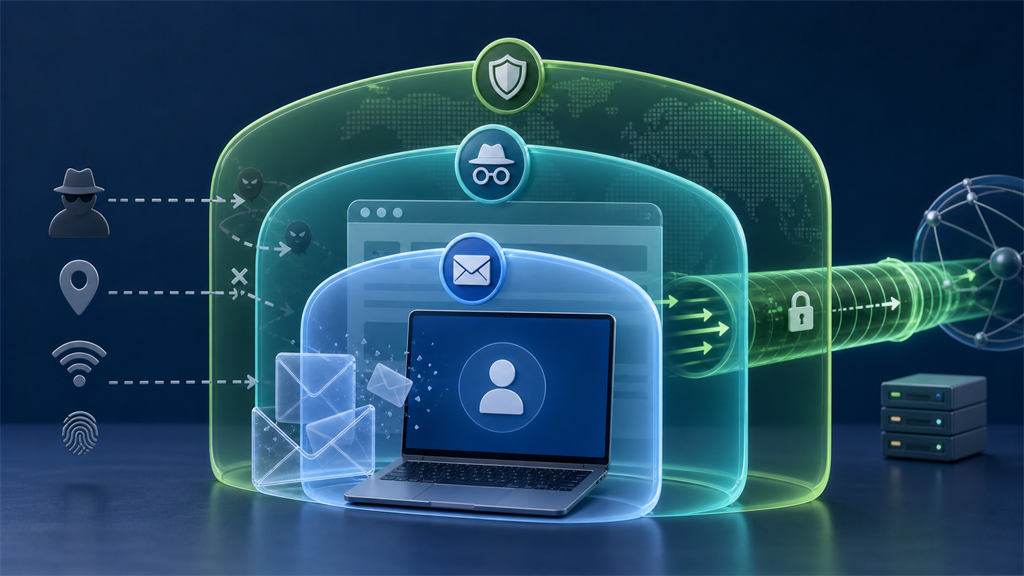
The short version
| Tool | Main purpose | Does not automatically hide |
|---|---|---|
| Temporary email | Your permanent email address | IP address, browser fingerprint, payment details |
| Private browsing | Local browsing history and some stored session data | IP address, websites you log into, all tracking |
| VPN | Public IP address from websites and some network observers | Email address, cookies, account identity |
Each tool is useful.
The mistake is expecting one tool to do another tool's job.
What temporary email protects
Temporary email protects the email-address layer.
A website receives a disposable address instead of your permanent address.
This can help with:
- One-time verification
- Low-risk downloads
- Reducing spam
- Separating unknown websites from your real inbox
- Testing signup flows
Temporary email is especially useful when future access does not matter.
It does not hide your IP address, browser, cookies, phone number, payment details, or information you type into a form.
For more detail, see What a Temporary Email Can and Cannot Hide.
What private browsing protects
Private browsing is mainly a local browser feature.
It can reduce what remains on your device after the session ends.
Depending on the browser, it may avoid saving:
- Browsing history
- Cookies after the private session closes
- Site data after the session closes
- Form history
Mozilla's private browsing documentation explains that private windows do not save browsing history, cookies, site data, or form information after they are closed.
Private browsing does not make you invisible to websites.
If you log into an account, the website knows it is you.
Your internet provider, employer, school, or network administrator may still have visibility depending on the network and device.
What a VPN protects
A VPN routes traffic through a VPN server.
Websites generally see the VPN server's IP address instead of the IP address assigned directly to your home, mobile, or office connection.
A VPN can help reduce exposure of:
- Your ordinary public IP address
- Approximate IP-based location
- Some network-level observation on untrusted Wi-Fi
It does not automatically hide:
- The email address you provide
- Accounts you log into
- Cookies
- Browser fingerprinting
- Payment information
- Phone numbers
- Device identifiers shared by apps or browsers
The FTC's VPN guidance notes that VPNs can hide information from some parties but do not make users anonymous to every website or service.
Common misconception: private browsing plus temporary email equals anonymity
Private browsing can create a cleaner browser session.
Temporary email can keep your primary address out of a form.
Together, they still do not hide everything.
A website may still see:
- IP address
- Browser and device characteristics
- Language and time zone
- Payment information
- Phone number
- Account behavior
- Anything you type into the site
If you enter your real name and credit card, the temporary address will not make the account anonymous.
Common misconception: a VPN makes temporary email unnecessary
A VPN and temporary email solve different problems.
A VPN may change the IP address visible to a website.
It does not stop the website from receiving the email address you enter.
If you provide your permanent email, the site still has a durable identifier it can store, share, or expose in a breach.
Temporary email can still be useful even when using a VPN.
Common misconception: temporary email hides tracking pixels
Temporary email does not automatically block tracking inside messages.
If a temporary inbox loads remote images, a tracking pixel may still record an open.
If you click a tracked link, the sender may still record the click.
The event may be connected to the temporary address rather than your permanent address, but the tracking mechanism can still work.
See How Email Tracking Pixels Work for a deeper explanation.
Which tool should you use?
Use temporary email when:
- You need a one-time message
- You do not want future email
- The account has little value
- The website does not need your permanent address
Use private browsing when:
- You want a session separated from your normal cookies
- You are using a shared computer
- You do not want local history saved after closing the window
- You want to test a site as a signed-out user
Use a VPN when:
- You want websites to see the VPN server's IP address
- You are on untrusted Wi-Fi
- You want to reduce exposure of your ordinary network address
Use a password manager and multifactor authentication for account security.
Those tools solve problems that temporary email, private browsing, and VPNs do not.
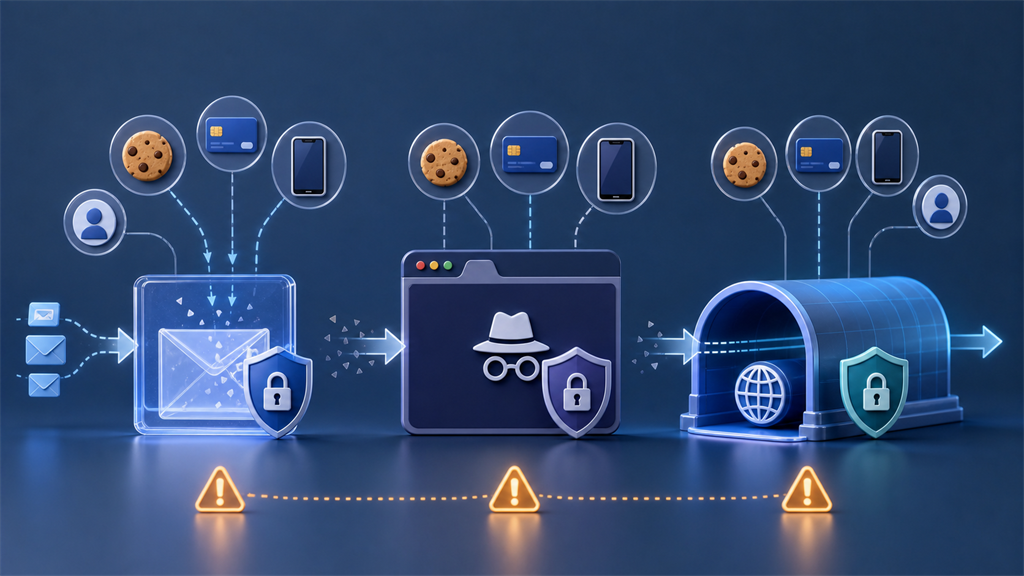
How the tools work together
A layered approach can be useful.
For a low-risk signup, you might use:
- Private browsing to avoid mixing the signup with existing cookies.
- Temporary email to avoid sharing your permanent address.
- A VPN if IP privacy matters.
- A unique password if the account may be kept.
This does not guarantee anonymity.
It does reduce the number of stable identifiers shared during a low-value interaction.
When not to rely on these tools
Do not rely on temporary email, private browsing, or a VPN alone for:
- Banking fraud protection
- Secure account recovery
- Malware protection
- Hiding illegal activity
- Protecting documents from exposure
- Preventing all tracking
- Replacing a password manager
- Replacing multifactor authentication
Privacy tools reduce specific risks.
They do not remove the need for good account security.
Practical examples
| Situation | Useful tool |
|---|---|
| One-time download | Temporary email |
| Shared family computer | Private browsing |
| Public Wi-Fi | VPN |
| Important bank account | Permanent email, password manager, MFA |
| Testing a signup flow | Temporary email and private browsing |
| Reducing spam | Alias or temporary email |
| Avoiding account tracking | Do not log in, limit cookies, consider private browsing |
How cookies change the picture
Cookies are one of the biggest reasons private browsing can help.
If you visit a website in your normal browser, the site may already have cookies from previous visits.
Those cookies can connect a new signup to older activity.
Private browsing usually starts with a fresh cookie jar and removes session cookies when the window closes.
That can reduce simple session linkage.
However, cookies are not the only tracking method.
Websites may also use:
- Account login
- Browser fingerprinting
- IP address
- Payment information
- Phone number
- Device identifiers
- Advertising identifiers
- Behavioral patterns
Temporary email handles only the email address.
Private browsing handles only some local browser state.
A VPN handles network address exposure.
Browser fingerprinting still matters
Browser fingerprinting attempts to identify a browser through a combination of characteristics.
Those may include:
- Screen size
- Browser version
- Operating system
- Time zone
- Language
- Installed fonts
- Graphics capabilities
- Supported features
Mozilla's fingerprinting protection documentation explains that browsers can include protections against known fingerprinting techniques.
Private browsing does not automatically make every browser look identical.
A VPN also does not change your browser fingerprint.
If fingerprinting is the main concern, use browser privacy protections and limit unnecessary permissions.
Account login overrides many privacy tools
If you log into an account, the service knows which account is active.
This is true even if you use:
- Temporary email
- Private browsing
- A VPN
- Tracker blocking
Logging in is a direct identifier.
For example, if you sign into a social media account in a private window, the site still knows it is that account during the session.
Private browsing may reduce what remains on your device afterward, but it does not make the logged-in session anonymous.
Payment and phone verification are strong identifiers
Email is only one identity field.
If you use temporary email but provide a personal phone number, the website may still recognize you.
If you use a VPN but pay with a card in your name, the transaction can still be connected to you.
If you use private browsing but enter your legal name and address, the website still has that information.
Privacy tools work best when your behavior matches your privacy goal.
Do not expect a tool to hide information you voluntarily submit.
How tools affect email tracking
Temporary email can separate an email tracking event from your permanent address.
It does not necessarily block the event.
Private browsing may affect what happens when you click a tracked link, especially if the browser session has fewer cookies.
A VPN may change the IP address visible after you open the link.
But tracked links can still include unique identifiers.
If the URL itself contains a campaign or recipient token, the sender may know which message was clicked even if other signals are reduced.
For email-specific tracking, image loading and link tracking are separate mechanisms.
When a VPN can make things harder
VPNs are useful, but they can sometimes trigger extra checks.
Websites may respond to VPN traffic with:
- CAPTCHA prompts
- Login challenges
- Fraud warnings
- Blocked registrations
- Additional phone verification
- Location mismatch alerts
This does not mean VPNs are bad.
It means websites use network reputation as one risk signal.
For important accounts, sudden changes in IP address or country can create support and recovery complications.
Use a VPN intentionally, not automatically for every sensitive account.
When private browsing can make things harder
Private browsing can also create friction.
Because cookies and session data are not preserved the same way, you may need to:
- Sign in again
- Re-enter verification codes
- Rebuild shopping carts
- Repeat consent choices
- Lose local draft data
That is usually acceptable for low-risk browsing or testing.
It can be inconvenient for accounts you use every day.
Use private browsing when session separation is useful.
Use a normal profile with strong privacy settings when continuity matters.
When temporary email can make things harder
Temporary email can be rejected by some websites.
It can also cause account recovery problems if you use it for an account that later matters.
You may lose:
- Password reset access
- Receipts
- Support replies
- Security alerts
- Login approvals
- Subscription notices
Temporary email is intentionally disposable.
Do not use it where durability is part of the account's safety.
A layered privacy example
Suppose you want to download a public checklist from an unfamiliar website.
A reasonable privacy setup might be:
- Private browsing to avoid mixing the site with your normal cookies
- Temporary email to avoid giving your permanent address
- No payment information
- No phone number
- Careful link inspection
That is a good match because the interaction is low-risk and short-lived.
Now suppose you are opening a bank account.
The better setup is different:
- Permanent secure email
- Unique password
- Multifactor authentication
- Official website or app
- No suspicious links
- Reliable recovery information
Temporary email is not appropriate just because privacy matters.
Important accounts need continuity.
Decision checklist
Ask these questions before choosing a tool:
- Am I trying to hide my permanent email address?
- Am I trying to avoid local browser history?
- Am I trying to change the IP address visible to a website?
- Am I logging into an account anyway?
- Am I providing payment or phone information?
- Will I need this account later?
- Would losing recovery access matter?
If the goal is email separation, use temporary email or an alias.
If the goal is local session separation, use private browsing.
If the goal is IP address privacy, consider a VPN.
If the goal is account security, use unique passwords, multifactor authentication, and reliable recovery.
The bottom line
Temporary email, private browsing, and VPNs are different layers.
Temporary email protects your permanent address.
Private browsing reduces local traces and separates some session data.
A VPN changes the IP address visible to websites and some network observers.
None of them hides everything.
Use Catch Temp Mail when the email relationship is temporary. Use private browsing when you want local session separation. Use a VPN when network address privacy matters. For important accounts, use durable email, unique passwords, and multifactor authentication.