
How to Reduce Spam Without Losing Important Email
By CatchTempMail · Published August 2, 2026
Spam control is not only about blocking unwanted messages.
It is also about keeping important email reachable.
If you use one address for everything, that address becomes easy to spam, track, and expose in breaches. If you use disposable addresses for everything, you may lose receipts, password resets, and account notices.
The better approach is to separate email by purpose.
This guide explains how to reduce spam while keeping access to the messages that matter.
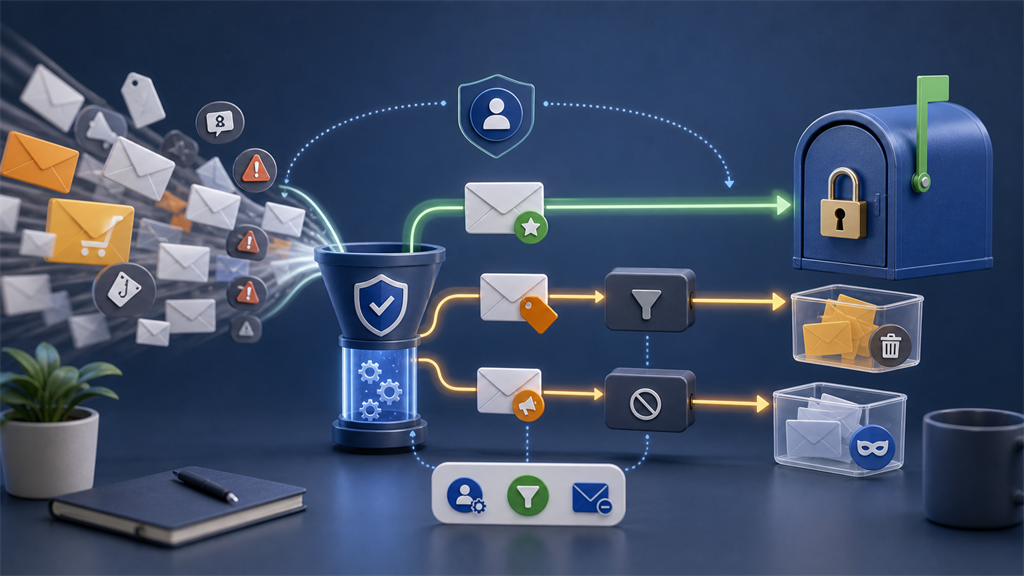
Start by sorting accounts by importance
Not every signup deserves the same email address.
Divide accounts into three groups:
- Important and long-term
- Useful but replaceable
- One-time or disposable
Important accounts include banking, healthcare, government, work, school, password managers, and paid services.
Useful but replaceable accounts include shopping, newsletters, forums, travel, and subscriptions.
One-time accounts include downloads, short trials, and websites you are only evaluating.
Spam control starts with using the right address for each group.
Protect your primary email address
Your primary email should be shared selectively.
Use it for:
- Personal communication
- Account recovery
- Financial institutions
- Government services
- Healthcare
- Employment
- Education
Avoid using it for random downloads, contests, coupon pages, unfamiliar forums, and sites that require email before showing low-value content.
The fewer places that know your primary address, the fewer places can leak or misuse it.
Use aliases for accounts you want to keep
Email aliases are useful for long-term accounts that should not receive your primary address.
Use aliases for:
- Shopping accounts
- Newsletters you read
- Travel websites
- Communities
- SaaS tools
- Subscriptions
- Loyalty programs
If each service gets a unique alias, you can disable one noisy address without changing your real inbox.
For the broader tradeoff, see Email Aliases vs. Temporary Email.
Use temporary inboxes for one-time interactions
Temporary email is best when future messages have no value.
Good use cases include:
- One-time verification
- Low-value downloads
- Short software trials
- Test accounts
- Websites you do not yet trust
The benefit is simple: unwanted follow-up messages do not enter your permanent mailbox.
If the inbox expires, that is acceptable because the relationship was not meant to continue.
Be careful with unsubscribe links
For legitimate companies, unsubscribe links can reduce future mail.
For suspicious messages, clicking unsubscribe can be risky. It may confirm that the address is active or send you to a phishing page.
The FTC guidance on unwanted email recommends using spam filters and being careful where you share your address.
Use unsubscribe when:
- You recognize the sender
- You previously signed up
- The domain is legitimate
- The message is not pretending to be urgent or threatening
Mark as spam or phishing when:
- The sender is unknown
- The message is fraudulent
- The link destination is suspicious
- The email asks for credentials or payment
Use filters for mail you still need
Filters are useful when the sender is legitimate but noisy.
You can route messages by:
- Sender
- Recipient alias
- Subject pattern
- Category
- Keywords
For example, receipts can stay in the inbox while promotions go to a lower-priority folder.
Do not over-filter security alerts, password resets, billing notices, or account warnings.
Spam reduction should not hide important account events.
Disable aliases when they become noisy
One advantage of aliases is attribution.
If a unique alias starts receiving unrelated mail, you know which relationship introduced that address.
That does not prove the company sold it. The address may have been exposed through a vendor, breach, or forwarding chain.
But you can still disable the alias and create a new one for that service if needed.
Avoid replying from your primary address
If you reply to a message sent to an alias or temporary address from your real account, you may reveal your primary address.
Before replying, check:
- The From field
- The visible name
- The signature
- Quoted text
- The account selected by your mail app
For long-term communication, use an alias service that supports replies or a separate durable mailbox.
Temporary inboxes are usually better for receiving than for ongoing conversation.
Watch for tracked links and pixels
Spam and marketing messages often contain tracking.
Blocking images can reduce pixel-based open tracking, but it does not stop tracked links.
If you click a unique link, the sender may associate the click with your address or alias.
Learn more in How Email Tracking Pixels Work.
Do not use temporary email for receipts you may need
Temporary inboxes are tempting for shopping because they keep promotions away.
But purchases create future needs:
- Delivery updates
- Return labels
- Refunds
- Warranty messages
- Recall notices
- Support replies
Use an alias for actual purchases.
Use temporary email for browsing, coupons with no purchase, or low-value interactions.
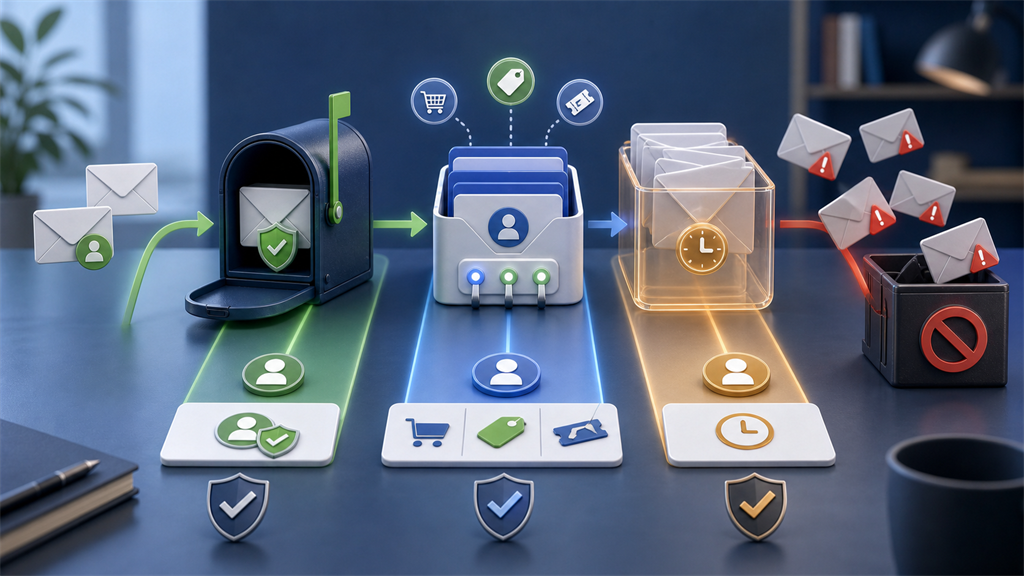
A practical address strategy
Use three layers:
| Use case | Best address |
|---|---|
| Banking, healthcare, government | Permanent email |
| Shopping, subscriptions, newsletters | Alias |
| One-time verification, low-value downloads | Temporary inbox |
This strategy reduces spam without sacrificing recovery.
What to do if spam is already out of control
If your main inbox is overwhelmed:
- Secure the account with a unique password and multifactor authentication.
- Search for critical senders and create filters for them.
- Unsubscribe from legitimate bulk mail.
- Mark suspicious mail as spam or phishing.
- Move new signups to aliases or temporary inboxes.
- Consider a new primary address for important relationships if the old one is heavily exposed.
Changing addresses takes work, but it can be useful when an old address has been public for years.
Identify the type of unwanted email
Not all unwanted email should be handled the same way.
Separate it into categories:
| Type | Best response |
|---|---|
| Legitimate newsletter | Unsubscribe or filter |
| Store promotion | Disable alias, unsubscribe, or filter |
| Unknown marketing | Mark as spam if unsolicited |
| Phishing | Report phishing |
| Malware attachment | Do not open, report |
| Account security alert | Verify through official site |
This matters because the wrong response can make the problem worse.
Clicking unsubscribe in a fraudulent message can expose you to more risk.
Marking a legitimate receipt sender as spam may hide future receipts or support replies.
Create a dedicated shopping address strategy
Shopping is one of the biggest sources of inbox clutter.
Stores may send:
- Order confirmations
- Delivery updates
- Return labels
- Review requests
- Coupons
- Seasonal promotions
- Loyalty messages
- Warranty notices
You probably need some of those messages, but not all of them.
For actual purchases, use an alias or durable shopping address.
Then create filters that treat order and shipping messages differently from promotions.
For example, you may keep delivery updates in the inbox while routing discount campaigns to a promotions folder.
Do not use temporary email for purchases where receipts, returns, or warranty records matter.
Use separate addresses for separate trust levels
One address cannot express context.
A better system might use:
- Primary address for important accounts
- Alias for each shopping account
- Alias for each newsletter you want
- Temporary inbox for unknown one-time signups
- Work address only for work
- A public contact address for websites or profiles
This separation makes it easier to respond when spam appears.
If your public contact address receives spam, that is expected.
If a unique alias receives unrelated mail, you know which relationship to investigate.
Do not rely only on filters
Filters help manage spam, but they do not reduce address exposure.
If hundreds of websites already know your main email address, filters can hide the problem from view, but the address is still circulating.
Filters should be combined with:
- Fewer signups using your primary address
- Aliases for long-term accounts
- Temporary inboxes for disposable interactions
- Password hygiene
- Phishing awareness
The goal is not only a cleaner inbox.
The goal is less dependency on one exposed identifier.
Review old accounts periodically
Old accounts often keep sending mail years after you stop using them.
Periodically search for:
- Welcome messages
- Account confirmations
- Old newsletters
- Abandoned trials
- Stores you no longer use
- Forums you forgot about
For accounts you do not need, close them where practical.
For accounts you might need, update them to a durable alias.
For messages with no ongoing value, unsubscribe if the sender is legitimate.
This cleanup can reduce future noise and reduce how many organizations store your primary address.
Watch for spam after breaches
Spam often increases after an address appears in a breach.
The new messages may reference:
- An old password
- A company you used
- Your name
- Your phone number
- An old purchase
That personalization can make scams look more credible.
If spam increases suddenly, review whether the address appears in known breaches and change any reused passwords.
See What to Do If Your Email Address Is in a Data Breach for a response plan.
Use temporary email to test unfamiliar sites
Some spam begins with curiosity.
You sign up for a tool, download a report, or enter a contest, then discover the sender emails constantly.
Temporary email is useful before trust is established.
If the website proves valuable, you can later create a durable account with an alias.
If it does not, the disposable address can expire without pulling your primary inbox into the relationship.
Keep account recovery visible
Spam reduction should not hide account security.
Make sure you can still see:
- Password reset messages
- Login alerts
- Billing failures
- Fraud warnings
- Subscription renewals
- Support replies
- Account closure notices
If filters move these messages out of sight, you may miss something important.
Create rules that separate promotional mail from security mail rather than treating all messages from a sender the same way.
Be careful with aggressive blocking
Blocking a sender can be useful, but it can also break future communication.
Before blocking, ask:
- Is this sender tied to an account I still use?
- Could I need receipts or support from this domain?
- Is there a separate promotional address I can filter instead?
- Would disabling an alias be safer than blocking a whole domain?
For important services, prefer account settings, notification preferences, and filters over broad blocking.
Migration plan for a cleaner inbox
If you want to reduce spam long term, migrate gradually.
- Choose which address will remain primary.
- Move important accounts first.
- Create aliases for shopping and subscriptions.
- Use temporary email for new low-value signups.
- Unsubscribe from legitimate old newsletters.
- Report phishing and unknown spam.
- Review filters after a few weeks.
Trying to fix everything in one day can be frustrating.
A gradual approach is more reliable.
Build habits for new signups
Spam prevention is easier before you share an address.
Before signing up, ask:
- Do I trust this website?
- Will I need this account later?
- Will I need receipts or support?
- Is the email required for a real purpose?
- Can I use an alias instead of my primary address?
- Is a temporary inbox enough?
This takes only a few seconds, but it prevents many future messages.
If the site is low-value, use temporary email.
If the account may matter, use an alias.
If the relationship is essential, use a permanent address you protect carefully.
Keep newsletters intentional
Newsletters are not always spam.
Some are useful, but they become a problem when every download, purchase, and webinar adds another recurring message.
Periodically review newsletters and ask:
- Do I still read this?
- Does it send more often than expected?
- Is it tied to an account I need?
- Would an alias make management easier?
- Should it go to a separate folder?
If you want the content, keep it under control with an alias or filter.
If you only needed one message, use temporary email next time.
Protect important senders from cleanup mistakes
When cleaning a crowded inbox, it is easy to delete or filter too aggressively.
Make a short list of senders that should remain visible:
- Banks
- Government services
- Healthcare portals
- Employer or school
- Password manager
- Domain registrar
- Cloud provider
- Payment processor
Do not route these messages into folders you rarely check.
Spam reduction should make the inbox calmer, not hide critical notices.
The bottom line
The safest spam strategy is not one tool.
It is address separation.
Use your primary email for important relationships, aliases for accounts you want to keep, and temporary inboxes for disposable interactions.
Catch Temp Mail helps with the third layer: one-time signups and low-risk messages that do not belong in your permanent inbox.